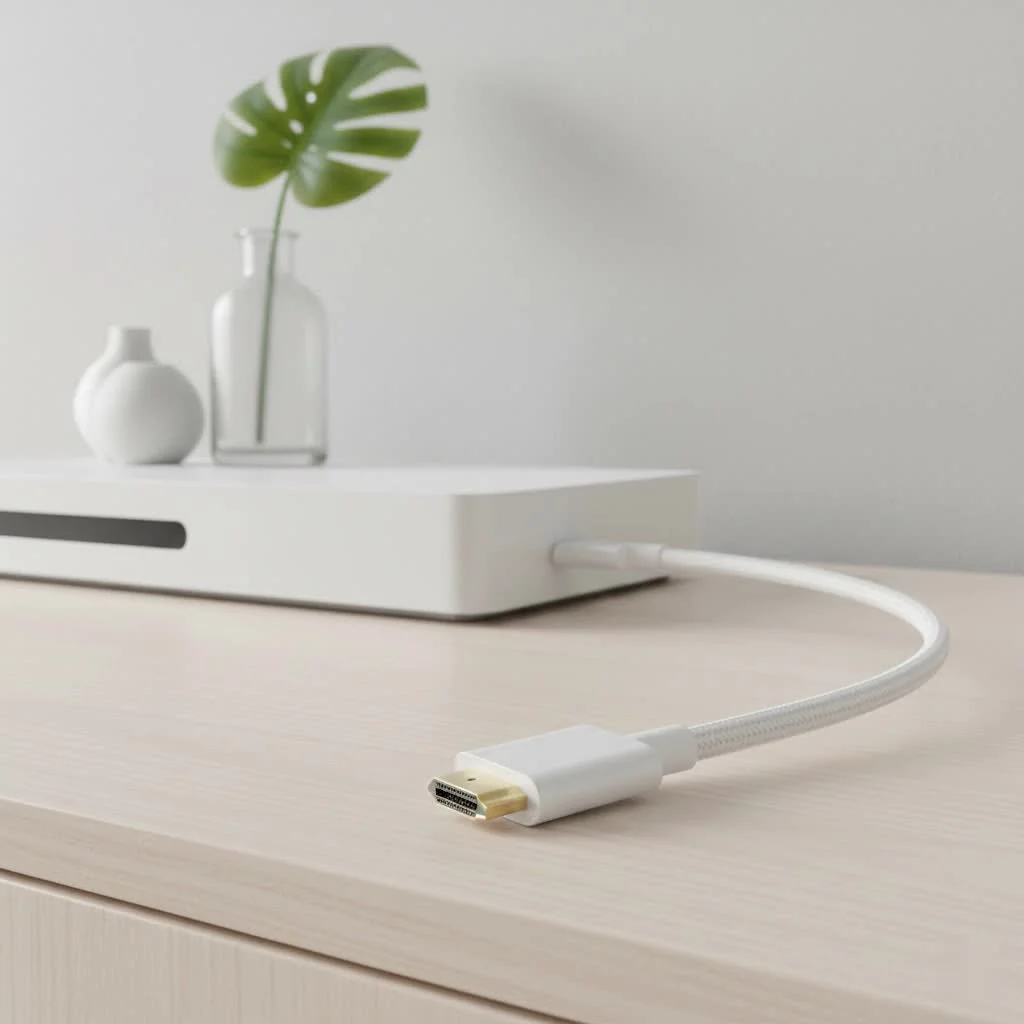
A micro HDMI to HDMI cable connects devices with a Micro HDMI port (Type D) to displays with a standard HDMI port (Type A), enabling high-definition video and audio transmission. This cable is essential for linking compact gadgets like action cameras, digital cameras, and some tablets to larger screens such as TVs or monitors. It ensures that smaller portable devices can display content on larger screens without sacrificing quality, supporting resolutions up to 4K at 60Hz or even 8K at 60Hz with HDMI 2.1 versions.
What is a Micro HDMI to HDMI Cable?
A micro HDMI to HDMI cable is a specific type of cable designed to connect a device with a Micro HDMI port (also known as HDMI Type D) to a device with a standard HDMI port (HDMI Type A). Think of it as a translator, allowing your smaller portable devices to speak the same visual language as your television, projector, or computer monitor.
While the standard HDMI connector is ubiquitous on TVs and gaming consoles, the Micro HDMI connector is significantly smaller, making it ideal for manufacturers to include on thinner and more compact devices without sacrificing high-quality video and audio output. This cable carries the exact same signal as its larger counterpart, ensuring no loss of quality.
Micro HDMI vs. Mini HDMI vs. USB-C: Clearing the Confusion
It’s easy to mix up the different small-form-factor connectors. Let’s break down the key differences to ensure you get the right cable for your device.
Micro HDMI (Type D)
This is the smallest of the HDMI connectors, measuring only 6.4mm x 2.8mm. It’s most commonly found on action cameras like GoPros, digital cameras, and some tablets and laptops. It has 19 pins, just like a standard HDMI, and supports all the same features.
Mini HDMI (Type C)
Slightly larger than Micro HDMI, the Mini HDMI connector measures 10.42mm x 2.42mm. It was more common on older DSLR cameras, camcorders, and some laptops. While functionally identical in signal quality, it’s a physically different port, and a Micro HDMI cable will not fit.
USB-C
This is the modern, versatile connector found on most new smartphones, laptops (including MacBooks), and tablets (like the iPad Pro). USB-C is a port, not a video standard. It can carry an HDMI signal, but it requires either a specific USB-C to HDMI cable or an adapter that supports “DisplayPort Alt Mode.” Not all USB-C ports support video output, so it’s crucial to check your device’s specifications.
Expert Insight: According to veteran AV installer, David Chen, “The most common mistake we see is customers buying the wrong cable. They see a small port and assume it’s one-size-fits-all. Always double-check your device’s manual or the port itself. It will usually be labeled. A Micro HDMI port looks like a shrunken-down version of a regular HDMI port, which is quite distinct from the oval shape of USB-C.”
Common Devices That Use Micro HDMI
The primary advantage of the Micro HDMI port is its small footprint, making it the go-to choice for manufacturers of compact, high-performance electronics. You will typically find a Micro HDMI port on:
- Digital Cameras: Many mirrorless and DSLR cameras use Micro HDMI to allow photographers and videographers to preview their shots on a larger field monitor or playback footage directly on a TV.
- Action Cameras: Brands like GoPro and DJI often incorporate Micro HDMI ports for direct video output.
- Single-Board Computers: Popular hobbyist and developer boards like the Raspberry Pi 4 use Micro HDMI ports to save space.
- Some Tablets & Laptops: Certain older or ultra-thin tablets and notebooks used Micro HDMI as their primary video-out port.
How to Choose the Perfect Micro HDMI to HDMI Cable
Not all cables are created equal. To ensure you get the best performance and reliability, consider these factors before you buy a micro HDMI to HDMI cable.
1. Match the HDMI Version to Your Needs
|
Our Picks for the Best HDMI Cable in 2026
As an Amazon Associate I earn from qualifying purchases.
|
||
| Num | Product | Action |
|---|---|---|
| 1 | 10K 8K HDMI 2.1 Cable 2-Pack 6.6FT, Highwings Certified 48Gbps Ultra High Speed Slim HDMI Cord,Support 4K@120Hz 8K@60Hz, HDCP 2.2&2.3, Dynamic HDR,eARC,DTS:X, Compatible with Roku TV/HDTV/PS5/Blu-ray |

|
| 2 | 15 Pack of 10 Foot hdmi Cables |
|
| 3 | Anker HDMI Cable 8K@60Hz, 6FT Ultra HD 4K@120Hz HDMI Cord,48 Gbps Certified Ultra High-Speed,Compatible with PlayStation 5,Xbox,Samsung TVs,and More |
|
| 4 | Highwings 4K HDMI Cable 6.6FT/2m - High-Speed HDMI 2.0 Quality Cord 4K@60Hz, Braided Nylon & Gold Connectors, HDR, Ethernet, ARC, 3D, HDCP 2.2, Compatible for PS-5/4/3/ HDTV/Monitor/DVD/Streaming |
|
| 5 | Highwings Long HDMI Cable 20 FT, 10K 8K 4K Ultra HD High Speed 2.1 HDMI Cable 48Gbps Braided Cord-4K@120Hz 8K@60Hz, DTS:X, HDCP 2.2&2.3, Dynamic HDR 10 Compatible with Roku TV/PS5/HDTV/Blu-ray |
|
| 6 | Highwings High Speed 8K 60Hz HDMI Cable 3.3FT/1M, 2.1 48Gbps HDMI Braided Cable-4K@120Hz 7680P,DTS:X,HDCP 2.2 & 2.3, HDR 10,eARC,Dynamic HDR,Compatible for Laptop, Monitor, Roku TV |
|
| 7 | Short HDMI Cable 1 FT 2-Pack, 8K HDMI 2.1 48Gbps Ultra High Speed Braided HDMI Cords, 1 Foot HDMI Cable for Camera, Field Monitor, External Recorder, Laptop, PC |
|
| 8 | Highwings 8K@60 HDMI Cable 10FT/3M, 48Gbps 2.1 High Speed HDMI Braided Nylon 4K120 144Hz RTX 3090 eARC HDR10 4:4:4 HDCP 2.2&2.3 Compatible for PS5, PS4, UHD TV and PC |
|
| 9 | Highwings 8K 10K 4K HDMI Cable 48Gbps 6.6FT/2M, Certified Ultra High Speed HDMI Cable Braided Cord-4K@120Hz 8K@60Hz, DTS:X, HDCP 2.2 & 2.3, HDR 10 Compatible with Roku TV/PS5/HDTV/Blu-ray |
|
| 10 | Highwings Long HDMI Cable 15 FT, 4K 8K 10K HDMI 2.1 Cord Ultra High Speed [in-Wall CL3 Rated, 8K@60Hz 4K@120Hz Video 48Gbps], Fit, Durable, Flexible, eARC, HDCP, Compatible for Ethernet SoundBar |
|
The HDMI standard has evolved over the years, with each version introducing more bandwidth and new features.
- High-Speed (HDMI 1.4): This is the baseline standard for most cables today. It’s sufficient for 1080p video at 60Hz and 4K video at 30Hz. For many basic use cases, this is perfectly adequate.
- Premium High-Speed (HDMI 2.0): If you plan to connect a 4K device, look for a cable that supports HDMI 2.0. This standard provides the necessary bandwidth for 4K resolution at a smooth 60Hz and adds support for High Dynamic Range (HDR).
- Ultra High-Speed (HDMI 2.1): This is the latest and greatest standard, offering a massive leap in bandwidth to support 4K at 120Hz and even 8K at 60Hz. While most Micro HDMI devices don’t output at this level, buying a 2.1-certified cable is excellent for future-proofing.
2. Consider Cable Length and Build Quality
- Length: Choose a length that comfortably reaches from your device to your display without being too taut or having excessive slack. Longer cables (over 15 feet) can sometimes suffer from signal degradation, so if you need a long run, invest in a higher-quality, well-shielded cable or an “active” cable with a built-in signal booster.
- Build Quality: Look for cables with gold-plated connectors, which resist corrosion and provide a better connection. A braided nylon jacket adds durability and prevents tangling, while sturdy strain relief at the connector ends prevents the cable from fraying with repeated plugging and unplugging.
3. Check for Essential Features
Beyond the version number, ensure the cable explicitly supports the features you need:
- 4K/8K Resolution: Make sure the cable is rated for the resolution of your device and display.
- HDR (High Dynamic Range): If your camera and TV both support HDR, your cable must too, in order to display the enhanced contrast and wider color gamut.
- ARC/eARC (Audio Return Channel): While less common in a Micro HDMI use case, this feature allows a single HDMI cable to send audio back and forth.
Frequently Asked Questions (FAQ)
Q: Can a Micro HDMI cable transmit audio?A: Yes, absolutely. Just like a standard HDMI cable, a micro HDMI to HDMI cable carries both high-definition video and multi-channel digital audio signals simultaneously.
Q: Is there a difference in quality between a Micro HDMI cable and a standard HDMI cable?A: No. As long as the cables are certified for the same HDMI version (e.g., HDMI 2.0), the signal quality will be identical. The connector size is purely a physical difference and does not impact performance.
Q: Can I use a Micro HDMI to HDMI adapter instead of a cable?A: Yes, you can use a small Micro HDMI male to standard HDMI female adapter connected to a regular HDMI cable. This can be a convenient option if you already have a standard HDMI cable. However, using a single cable eliminates an extra connection point, which can sometimes be a point of failure.
Q: Will a Micro HDMI cable work with my smartphone?A: It is highly unlikely. Most modern smartphones use a USB-C port for charging and video output. The MHL standard, which allowed some older Android phones to output video via a micro-USB port, has largely been replaced by USB-C’s DisplayPort Alt Mode.
Q: My Micro HDMI cable isn’t working. What should I do?A: First, ensure the cable is securely plugged in at both ends. Second, check your display’s input source to make sure it’s set to the correct HDMI port. Third, try connecting to a different HDMI port on the display. Finally, test the cable with a different device if possible to rule out a faulty cable or port.
The Final Connection
Choosing the right micro HDMI to HDMI cable is a simple decision once you understand what to look for. By identifying your device’s port, matching the cable’s capabilities to your display’s resolution, and investing in a well-made product, you can ensure a flawless, high-quality connection every time. Don’t let a small connector stand between you and a big-screen experience. Check your devices, grab the right cable, and unleash the full visual power of your portable tech.
Frequently Asked Questions
Can a Micro HDMI cable transmit audio?
Yes, a micro HDMI to HDMI cable transmits both high-definition video and multi-channel digital audio signals simultaneously. This functionality is identical to that of a standard HDMI cable, ensuring a complete multimedia experience.
Is there a difference in quality between Micro HDMI and standard HDMI cables?
No, there is no difference in signal quality between Micro HDMI and standard HDMI cables, provided they are certified for the same HDMI version (e.g., HDMI 2.0). The connector size is purely a physical distinction and does not impact performance or signal integrity.
Can I use a Micro HDMI to HDMI adapter instead of a cable?
Yes, you can use a small Micro HDMI male to standard HDMI female adapter with a regular HDMI cable. This offers flexibility if you already own a standard HDMI cable. However, using a single, dedicated cable can reduce potential points of failure compared to an adapter-plus-cable setup.
Will a Micro HDMI cable work with my smartphone?
It is highly unlikely that a Micro HDMI cable will work with most modern smartphones. The majority of contemporary smartphones utilize a USB-C port for both charging and video output, often supporting DisplayPort Alt Mode. Older Android phones might have used MHL via micro-USB, but Micro HDMI is not a common smartphone port.
What should I do if my Micro HDMI cable isn't working?
If your Micro HDMI cable isn't working, first ensure both ends are securely plugged in. Next, verify your display's input source is set to the correct HDMI port. Try a different HDMI port on the display, and if possible, test the cable with another device to determine if the issue is with the cable, device, or display port.
How to Choose the Perfect Micro HDMI to HDMI Cable
To select the best micro HDMI to HDMI cable, consider the HDMI version, cable length, build quality, and essential features like 4K/8K resolution and HDR support.
Identify the HDMI version required for your devices. HDMI 1.4 supports 1080p at 60Hz and 4K at 30Hz. For 4K at 60Hz and HDR, choose HDMI 2.0. For future-proofing with 4K at 120Hz or 8K at 60Hz, opt for an HDMI 2.1 certified cable.
Select a cable length that provides comfortable reach without excessive slack; for runs over 15 feet, consider a high-quality, shielded, or active cable. Look for gold-plated connectors for corrosion resistance, a braided nylon jacket for durability, and sturdy strain relief to prevent fraying.
Ensure the cable explicitly supports the features you need, such as 4K/8K resolution and HDR (High Dynamic Range) if your devices support them. While less common for Micro HDMI, check for ARC/eARC if audio return functionality is desired.
Get our weekly buyer guide
Practical specs, not advice. Unsubscribe anytime.
I bought this to link my tablet to my TV, and while it does work, I noticed a slight delay when playing games. It’s fine for watching movies, but for anything interactive, it’s a bit noticeable. I was hoping for seamless 4K at 60Hz, but maybe my tablet is the bottleneck. It’s okay for basic use.
This cable works great for connecting my older digital camera to my monitor. I was worried about losing quality, but it supports 1080p perfectly. I wish it came in a slightly longer length option, but for the price, it’s a solid buy. No issues with audio or video transmission.
Needed a reliable cable for my new mirrorless camera to display photos on my big screen, and this micro HDMI to HDMI cable is perfect. The build quality feels durable, and the connection is secure. It’s fantastic to see my high-res photos without having to transfer them first. Very happy with this purchase.
I finally got one of these micro HDMI to HDMI cables for my GoPro, and it’s a game-changer! I can now easily view my action camera footage on my 4K TV without any hassle. The picture quality is super crisp, exactly as promised. Definitely recommend for anyone with a compact gadget.